Notifications
RoleAdministratorRead25 min
Screen
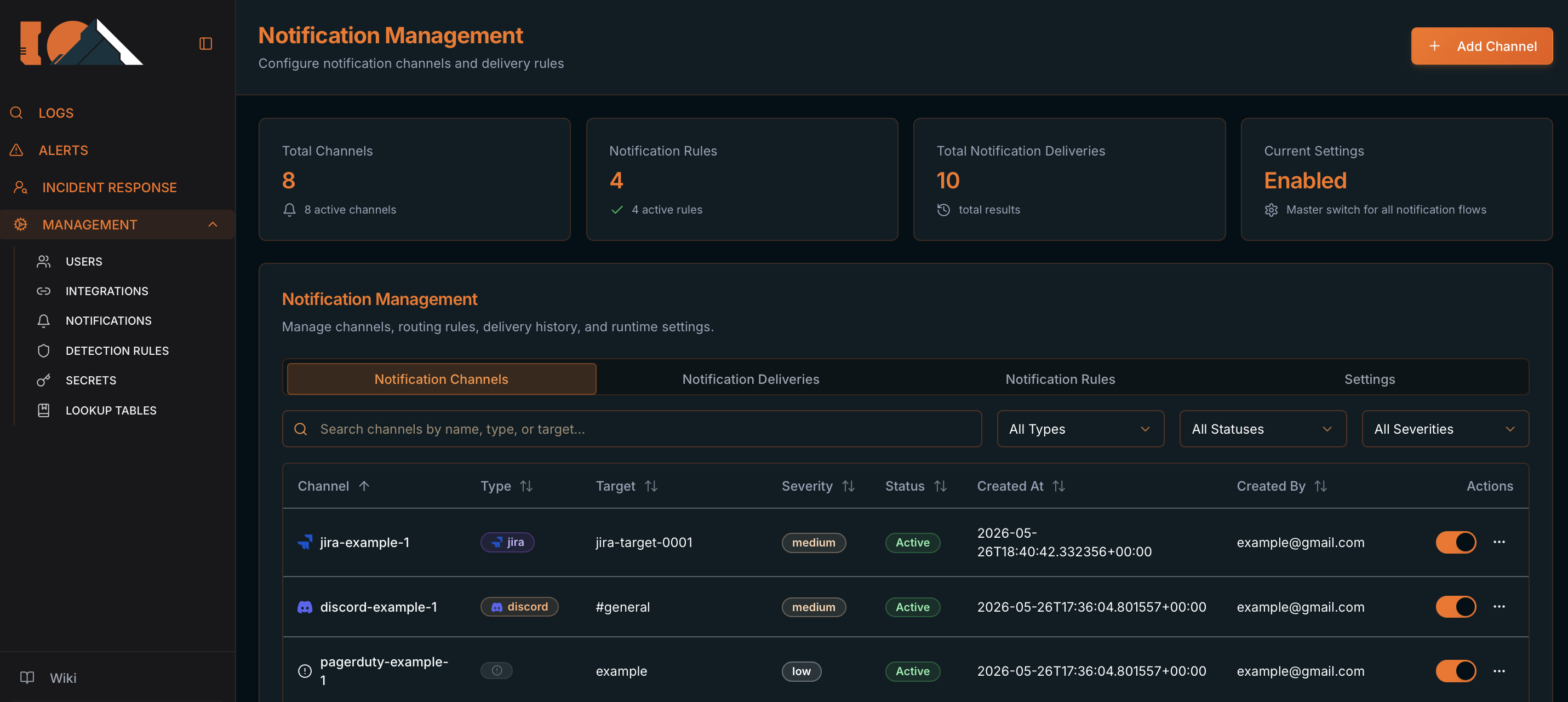
Notification Management
/management/notificationsAffinity delivers alerts through **channels** (Slack, Discord, Telegram, Jira, etc.) and routes them with **notification rules** (by severity or by detection rule). You can also set a fallback channel on each Detection Rule.
What it's for
Configure alert destinations, routing rules, delivery history, and the master switch. Covers the full screen, not just channel creation.
Before you start
- Admin permissions on
/management/notifications. - For Slack/Discord/Telegram: create a secret first in MANAGEMENT → SECRETS with webhook credentials (the form uses Notification Secret Name).
- For Jira: have the Jira Base URL, Issue Type, and an API credentials secret ready.
Expected result
- Enabled channels appear in rule selectors and in Notification Rules.
- Alerts route via severity or detection routing rules; if no match, the rule's fallback channel is used.
- Deliveries are logged in Notification Deliveries with status and error detail.
Tips
- Typical pattern: By severity rule for
critical/high→ SOC channel; By detection rule for specific rules → owner team channel; fallback on the Detection Rule for everything else. - Create the secret before the channel — without Notification Secret Name you cannot complete the form.
- Test each channel with Send Test — the UI switches to Notification Deliveries so you can see
sentvsfailed. - If alerts don't arrive: check Settings ON → active rules → enabled channel → Deliveries tab → filter by Failed and open the error detail.
The screen — four tabs
- Route: MANAGEMENT → NOTIFICATIONS (
/management/notifications). - Summary cards on top: Total Channels, Notification Rules, Total Notification Deliveries, Current Settings (Enabled/Disabled — master switch).
- Four tabs:
- Notification Channels — create and manage destinations.
- Notification Deliveries — send history, errors, and resends.
- Notification Rules — routing rules (by severity or by detection rule).
- Settings — Enable Notifications (master switch).
How Affinity picks a destination
- Delivery is evaluated in this order:
- 1. Active notification rules on the Notification Rules tab — if a rule matches, its channels are used.
- 2. The Detection Rule's Notification Channel (Rule Management step or Alert delivery when editing) — fallback when no routing rule matches.
- 3. No delivery — if no routing rule matches and no fallback channel is set.
- Global requirement: Enable Notifications (Settings tab) must be ON. When OFF, alerts are not sent (channel tests and manual re-sends still work).
- There is no “use case” routing in the UI — only By severity and By detection rule.
Notification Channels tab — list
- Add Channel (header) opens the create modal.
- Filters: search (
Search channels by name, type, or target...), Type (All/Slack/Discord/Jira/Email), Status (Active/Inactive), Severity. - Columns: Channel, Type, Target, Severity (shows
allif unset), Status, Created At, Created By, Actions. - Each row: inline enable switch + Actions menu → Edit Channel, Send Test, Delete Channel.
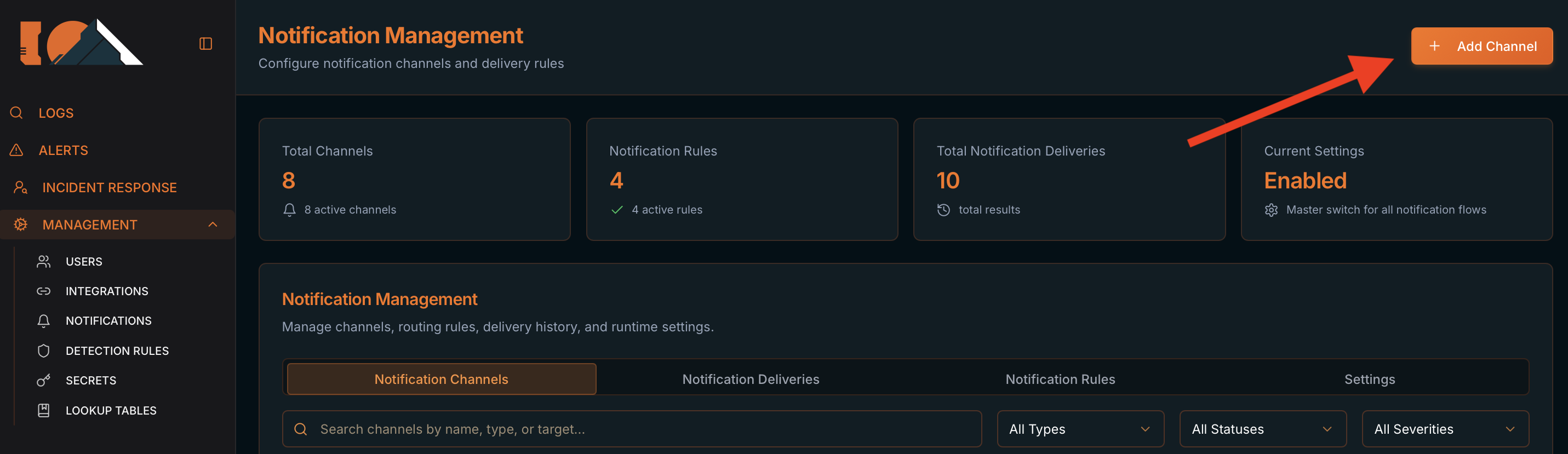
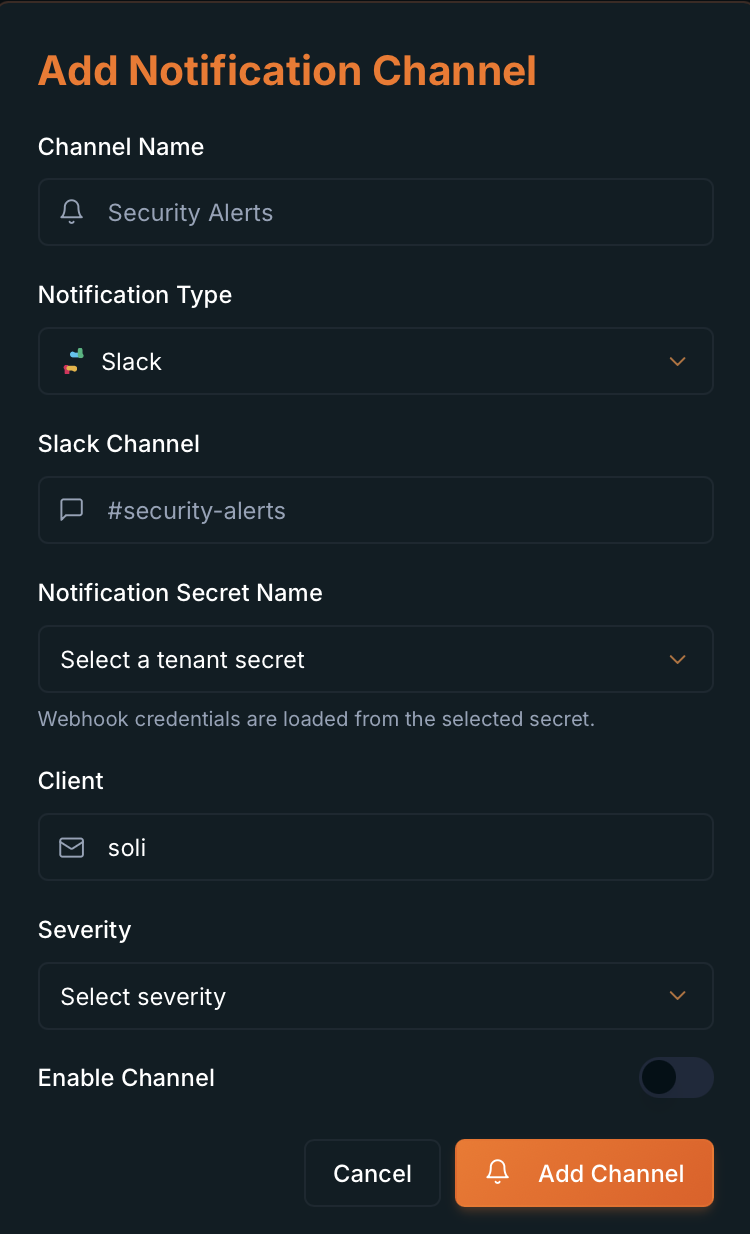
Create a channel (Add Notification Channel)
- Channel Name * — internal name (e.g.
Security Alerts). Shown asname (type)in Detection Rule selectors. - Notification Type * — on create:
Slack,Discord,Telegram, orJira. On edit also:Webhook,PagerDuty,Email,WhatsApp. - Slack Channel / Discord Channel / Telegram Chat ID / Jira Project * — destination per type. Slack must start with
#; Telegram must be numeric. - Notification Secret Name * — tenant secret with webhook credentials (except Jira/Webhook which use a direct URL).
- Jira Base URL + Issue Type — Jira only (
Task,Bug,Story,Incident). - Client * — tenant identifier. Default
soli. - Severity — optional channel metadata (not the same as routing severities).
- Enable Channel — switch (off by default). Only enabled channels appear in selectors.
- Confirm with Add Channel.
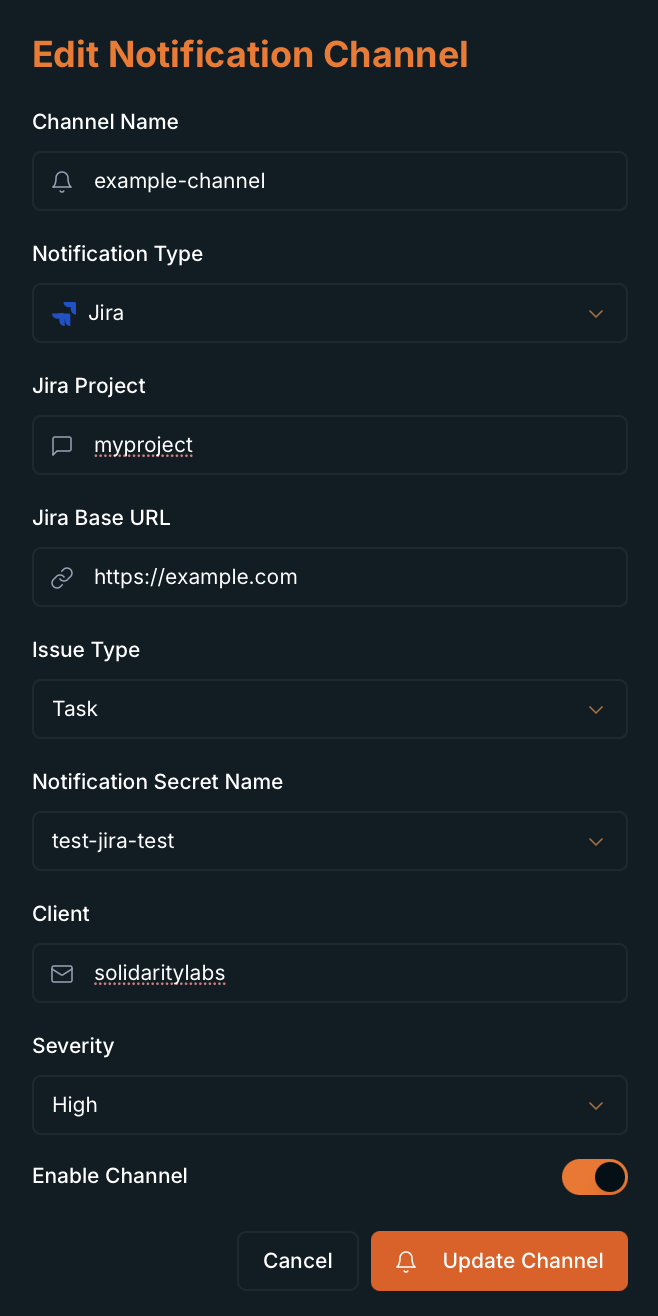
Edit, test, and delete channels
- Edit Channel opens Edit Notification Channel with the same fields. Save with Update Channel.
- Send Test sends a test notification (
Channel connection test - {name}) to validate credentials. - Delete Channel asks for confirmation in Delete Notification Channel (irreversible).
Notification Rules tab — Rule Editor
- Rule Editor section: Choose a delivery strategy: route by alert severity across all detections, or target specific detection rules.
- Two strategies (Delivery strategy):
- By severity (
severity_tier) — Any alert matching the selected severities is sent to the chosen channels. Applies to alerts from any detection rule with those severities. - By detection rule (
detection_specific) — Only alerts from the selected SIEM detection rules use this delivery path. Routes by stable rule ID (renaming the rule does not break routing).
Create a routing rule
- Rule name — descriptive name (e.g.
Critical incidents to SOC channels). - Channels * — multi-select; pick one or more destination channels.
- If By severity is selected:
- Alert severities * — multi-select:
critical,high,medium,low. Default on new rule:critical+high. - Helper: Applies to alerts from any detection rule with these severity levels.
- If By detection rule is selected:
- Detection rules * — multi-select by display name; routes by internal ID.
- Helper: Routes by stable detection rule ID. Renaming a rule in SIEM does not break delivery.
- Enabled — switch (on by default). Helper: Controls whether this rule dispatches deliveries.
- Save with Create Rule or Update Rule when editing. Cancel Edit discards changes.
- Table below: Name, Strategy (
By severity/By detection rule), Routing criteria, Channels, Status, Created At, Created By, Actions (Edit / Delete).
Fallback channel on Detection Rules
- In addition to routing rules, each Detection Rule can have its own Notification Channel:
- On create (Rule Management step) or edit (Alert delivery block).
- Optional. Only enabled channels in the selector (
name (type)). - Used when no Notification Rules entry matches the alert.
- Wizard helper: Primary channel (Jira, Slack, etc.) for alerts from this rule. Used when no notification rule matches by severity or rule name.
Notification Deliveries tab — overview
- Log of every alert delivery attempt to a channel (Slack, Discord, Telegram, Jira, PagerDuty, etc.).
- Each row is one delivery: a fired alert to a specific channel, with timestamp, status, and metadata.
- Use it to audit what was notified, diagnose failures, and retry deliveries that did not arrive.
- The Total Notification Deliveries summary card (top) shows the count for the current page.
- After Send Test on a channel, the UI automatically switches to this tab so you can see the test result.
Notification Deliveries — filters and table
- Search — placeholder
rule, alert id, target...; filters by rule name, alert ID, or destination. - Status —
All,Sent,Failed. - Type —
All,slack,discord,telegram,jira,pagerduty. - Columns (all sortable by clicking the header): Sent At, Status, Type, Target, Rule, Severity, Actions.
- Under Status: green
sentbadge or redfailedbadge. On failure, an error summary appears below (truncated in the row). - Pagination: 10 deliveries per page, cursor-based next/previous navigation.
- Loading states:
Loading deliveries...on initial load; overlay when refreshing with data already visible.
Notification Deliveries — view detail
- Click a row or Actions menu (⋯) → View expands the Delivery Detail panel below the row.
- To close: Hide detail (Actions menu), Close button on the panel, or click the row again.
- On expand, the UI fetches full detail from the server (
Loading delivery detail...). - Delivery Detail panel fields:
- Delivery ID — unique delivery identifier (top of panel).
- Alert ID — the Affinity alert that triggered the send.
- Channel —
notification_channel_idof the channel used. - Status Code — HTTP or provider response code.
- Source — event origin (e.g. alerts engine or channel test).
- Payload Mode — payload mode used for the send.
- Provider Response ID — ID returned by the provider (Jira ticket, message ID, etc.).
- If status is
failed, an Error block shows the full message (combineserror_messageand provider response).
Notification Deliveries — actions
- Per-row Actions (⋯) menu:
- View / Hide detail — expand or collapse the detail panel.
- Re-Send — only shown when status is not
sent(failed or pending deliveries). For Jira the label is Re-Send Ticket. - On confirm, dialog Re-Send Notification (or Re-Send Jira Ticket): Re-send the original alert for delivery "{id}"? Only the failed {type} channel will receive this attempt.
- Dialog buttons: Cancel and Re-Send (shows Re-Sending... while processing).
- On success: toast Re-send queued and the list refreshes automatically.
- On failure: toast Re-send failed with the error message.
- Re-sends work even when Enable Notifications is OFF (same as channel tests).
- You cannot re-send deliveries with
sentstatus — those already delivered successfully.
Settings tab
- Notification Settings — Turn all notification deliveries on or off for this client.
- Enable Notifications — master switch. Helper: When off, alert deliveries are skipped. Channel tests and manual re-sends still work.
- When OFF, the Current Settings card shows Disabled.